
Understand GST and BAS in Australia with this quick guide. Learn how GST works, when to register, and how to lodge BAS to stay compliant with the ATO
GST (Goods and Services Tax) is a 10% tax on most goods and services sold in Australia. If you're registered for GST, you're expected to charge it on sales, pay it to the ATO, and claim back the GST on your eligible business purchases.
If your GST turnover hits $75,000 or more, you’ve got 21 days to register. In some cases, you’ll need to register no matter what you earn, like if you’re driving for Uber or doing other ride-share gigs. Earning less? You can still register voluntarily if it makes sense for your business. Got questions? Reach out to us in the app chat. ANNA can help you get registered.
With Anna, you can register for GST at the same time you form your company. If you already have a business, you can register for GST yourself via the ATO Business Portal or by phone on 13 28 66, or you can simply speak with our tax expert and have them handle the registration for you.
A Business Activity Statement (BAS) is your regular tax check-in with the ATO. It’s where you report and pay GST, PAYG withholding (tax on wages), PAYG instalments (prepaid tax), and other business taxes. Most small businesses lodge it quarterly. See a sample.
An Instalment Activity Statement (IAS) is like a mini BAS. It’s used to report and pay things like PAYG instalments or withholding tax. You’ll usually get one monthly from the ATO if you need to lodge it. See a sample.
Both are ATO forms used to report and pay business taxes but they serve different setups: BAS is the full kit: GST, PAYG withholding, PAYG instalments, and more IAS is the smaller version: no GST, just PAYG obligations. Example Time: Let’s say your business is registered for GST and lodges BAS quarterly. You’ve also got employees, so you’re withholding PAYG tax from their wages. If your payroll hits a certain threshold, the ATO might ask you to report PAYG withholding monthly, even if everything else stays quarterly. In that case, you’ll lodge a quarterly BAS for GST and PAYG instalments, and a monthly IAS just to handle PAYG withholding for your team. Still Confused? Check out ‘Simpler BAS’ If your GST turnover is under $10 million, you only need to report 3 things under the “Simpler BAS” method: G1 – Total Sales 1A – GST on Sales 1B – GST on Purchases
If you're on quarterly BAS, your due dates are below:
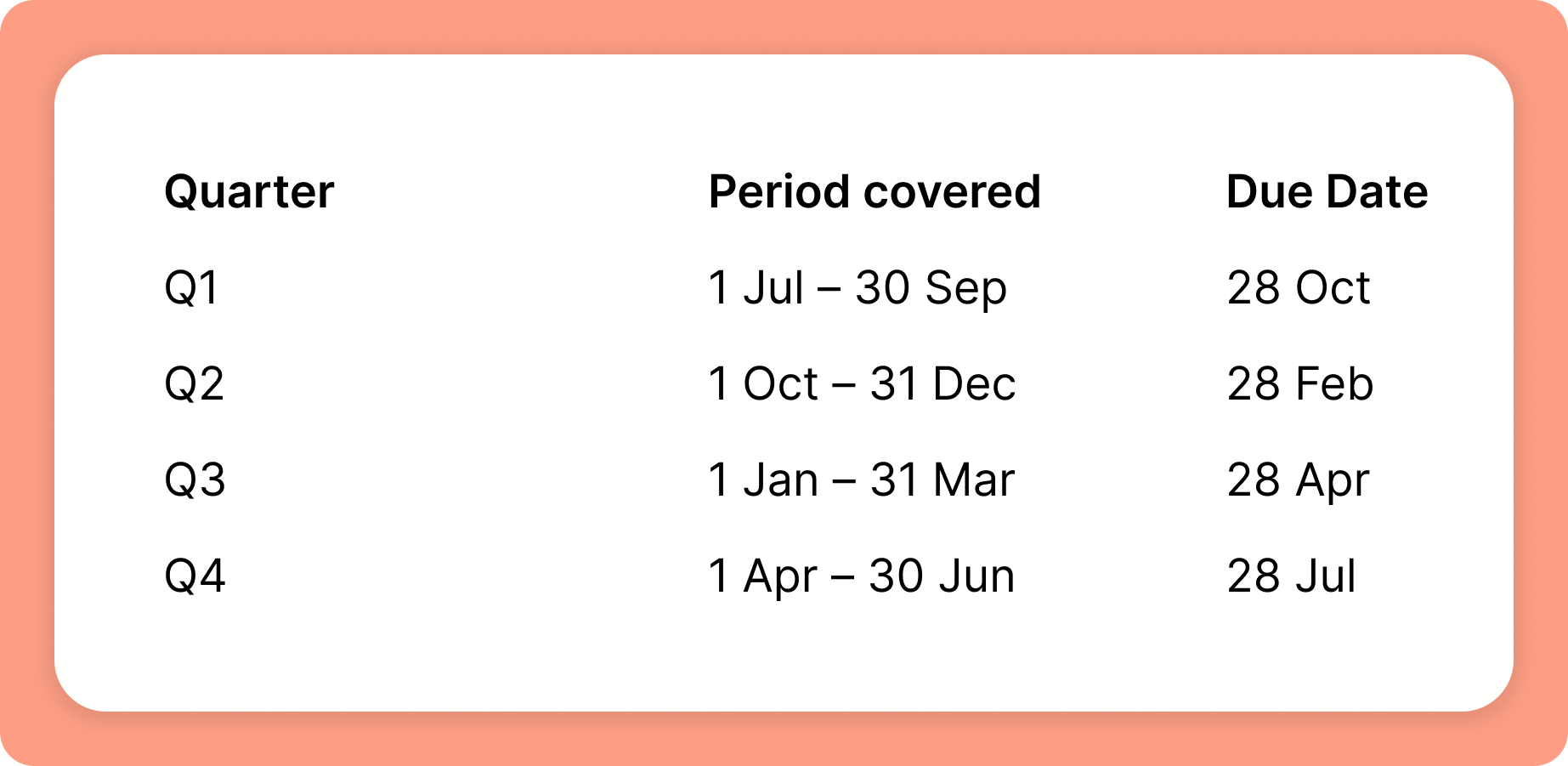
On monthly BAS? Pop into the app chat and give us a wave, we'll help you out. Bonus: Lodging online? You could get up to 2 extra weeks, except for Q2 (1 Oct to 31 Dec), as the due date of 28 Feb already includes a Christmas extension. Note: Due dates apply to both lodgement and payment. Stressed about remembering the dated? Your ANNA tax calendar has deadline reminders tailored just for you.
ANNA +Taxes is available for newly registered companies – first 1,000 customers get 6 months free. We auto-categorise your transactions and take care of your lodgements.
Register NowHop on the ATO website. You’ll need an ABN first. ANNA can also help you get GST registered. Just message us in the app chat
Your GST turnover is your total business income (not your profit), minus:
• GST included in sales to your customers
• Sales to associates that aren't for payment and aren't taxable
• Sales not connected with an enterprise you run
• Input-taxed sales you make
• Sales not connected with Australia
• Cash: Report when money hits your bank account or leaves it
• Accrual: Report when invoices are issued/received, regardless of payment
Most small businesses go with cash to keep cash flow simple
• To add GST, multiply the net price by 1.1
• To find the GST amount, divide the GST-inclusive price by 11
• To remove GST, divide the GST-inclusive price by 1.1
If your product price is $100 (excluding GST):
• Add GST: $100 × 1.1 = $110 (price including GST)
• GST amount included: $110 ÷ 11 = $10
• Price without GST: $110 ÷ 1.1 = $100
If you’re using ANNA, our invoice generator and receipt capture tool will sort and allocate the GST for you. No stress, no spreadsheets
You bet. Head over to Money Smart’s GST calculator. It’s quick, easy, and does the calculations for you. No brain strain required
If you’re using ANNA, our invoice generator and receipt capture tool will sort and allocate the GST for you - no calculator needed
Almost! But you’ll need:
To register for GST for your business
A valid tax invoice with the GST component clearly stated
The purchase to relate directly to your business
Some things (like basic foods, entertainment) are off-limits. Check the ATO website for more details
Just letting you know: The ATO is warning businesses not to mess around with fake or inflated GST refund claims. If it looks fishy, they’ll investigate and penalties aren’t pretty. Keep your records clean and your claims legit
Search your ABN on the ABN Lookup or log in to your ATO account. Or, you guessed it, ask us in the app chat
Most small businesses lodge quarterly, but it depends on your GST turnover. Less than $10 million? Quarterly is your default. Over $20 million? You’re in the monthly club. Check the ATO website for more details
Here is cash basis BAS preparation steps simplified for you:
Match all transactions for the period to your bank statements and assign them to the right categories
Verify GST is correctly applied to income and expenses for each transaction
Check payroll is up to date and PAYG withholding is accurate
Check your current BAS if there is a pre-filled PAYG instalment for this period
Add up GST collected on sales, subtract GST paid on expenses, then add PAYG withholding and any PAYG instalments to find the total BAS payable
Log in to the ATO’s Online Services for Business using your myGovID. You’ll need to link your business on RAM (that’s the Relationship Authorisation Manager). Need help setting it up? Our New Company Setup Checklist has you covered
You can pay via BPAY, credit card, Direct Debit or bank transfer. Using ANNA? Just pay with your ANNA business card. We’ll match the payment to your ATO bill, easy as that
Can’t find your BAS reference number? No stress, just message us in the app chat and we’ll track it down for you
ANNA is not currently SBR-enabled, but we’re actively working on integrating Standard Business Reporting (SBR) functionality. We’re aiming to launch this capability by Q2 2026 to support seamless ATO BAS lodgements directly through the platform

.svg)